
Gaming Chair Buying Guide
Best Gaming Chairs with Adjustable Armrests
Find a gaming chair that lets you position your armrests around your body and desk. Compare 2D, 3D, 4D, and 5D adjustments, explore recommended models, and learn which features are worth paying for.
Quick recommendation: Look for a chair with height-adjustable armrests at a minimum. If you regularly switch between gaming, typing, and controller use, 4D armrests offer more flexibility by adding front-to-back and sideways positioning. Check the actual adjustment range, not just the feature label.
Armrests can make a noticeable difference in how a gaming chair fits your setup. If they sit too high, your shoulders may feel raised. If they sit too low, your arms may lack support. Armrests that are too far apart or too close together can also make it difficult to find a comfortable position.
The best gaming chairs with adjustable armrests let you align your elbows and forearms with your desk, keyboard, or controller. However, extra adjustment is only useful when the chair fits your body and the armrests move far enough in the directions you need.
This guide compares several gaming-chair models with adjustable armrests, explains the differences between adjustment types, and provides a practical checklist for choosing the right chair.
Best Gaming Chairs with Adjustable Armrests: Our Picks
The following models are worth comparing because they offer multiple armrest adjustments or larger-size configurations. They serve different needs and budgets, so consider the chair’s overall fit, seat dimensions, support features, and current price alongside armrest functionality.
1 · Premium All-Around Option
Secretlab TITAN Evo
The Secretlab TITAN Evo is a premium option to consider if you want adjustable armrests alongside a broad set of ergonomic features. Its full-metal 4D armrests can move in multiple directions, while the CloudSwap system supports compatible replacement armrest tops.
The chair is available in different sizes, making it important to choose the version that matches your height and build rather than assuming one size will fit everyone.
Why consider it
- Full-metal 4D armrest mechanism
- Replaceable compatible armrest tops
- Multiple size options
- Integrated adjustable lumbar support
Best for: Buyers who want premium adjustability and are comfortable paying more for a feature-rich chair.
Check Secretlab TITAN Evo on Amazon
Manufacturer details: Secretlab TITAN Evo features.
2 · Ergonomic Gaming Focus
Razer Iskur V2
The Razer Iskur V2 combines 4D armrests with an adjustable lumbar support system. It is worth considering if you want to fine-tune both your arm position and lower-back support for a desk-based gaming setup.
Its armrests support height, front-to-back, sideways, and rotational adjustments. Before purchasing, verify the chair’s dimensions and recommended weight range against your own requirements.
Why consider it
- 4D adjustable armrests
- Integrated adjustable lumbar support
- Multiple ways to position the armrests
- Gaming-focused design
Best for: Gamers who want to adjust arm placement and lumbar support together.
Check Razer Iskur V2 on Amazon
Manufacturer details: Razer Iskur V2 specifications.
3 · Customizable Armrest Tops
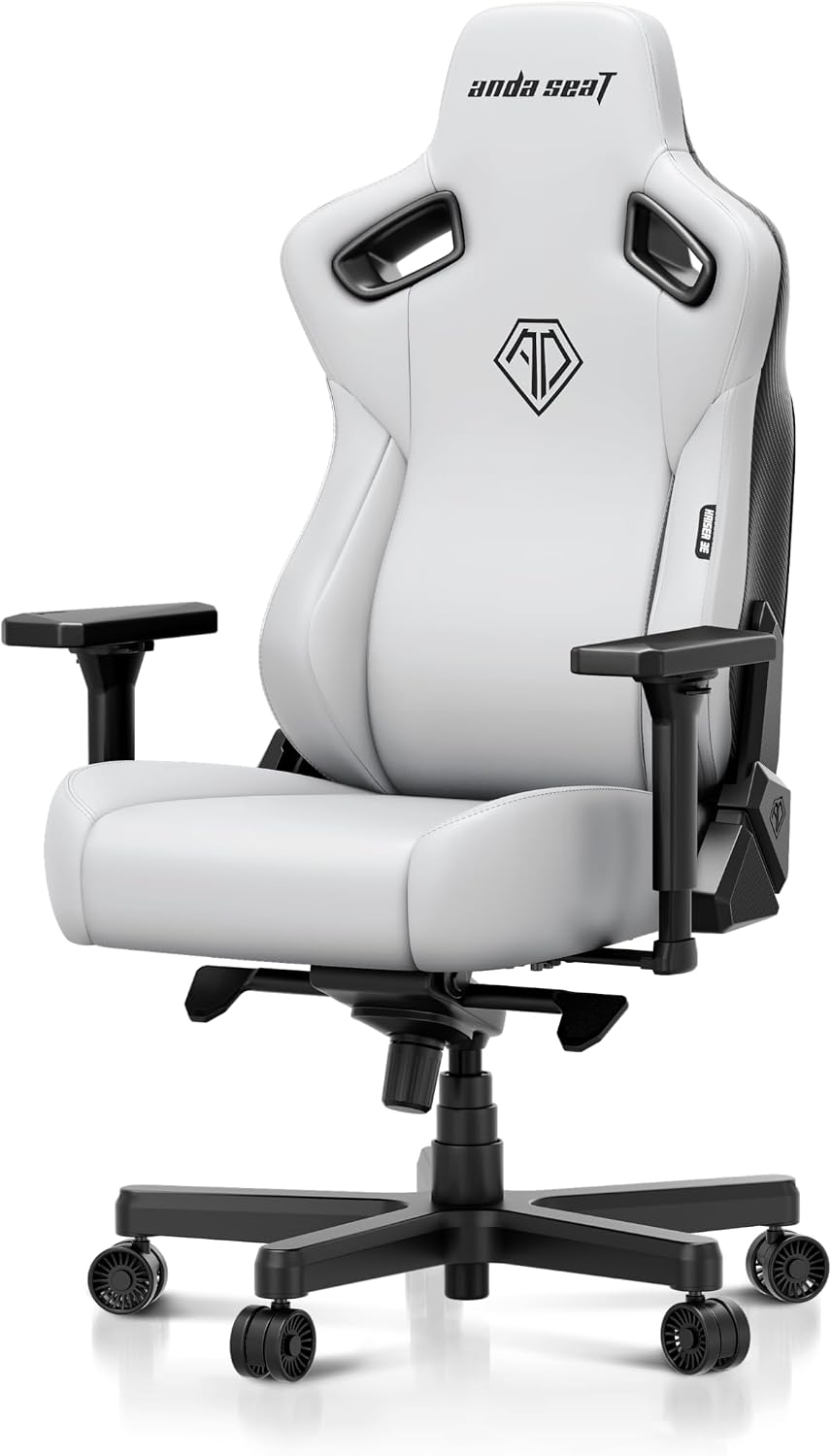
AndaSeat Kaiser 3
The AndaSeat Kaiser 3 is another premium gaming chair to compare. Its standard Kaiser 3 configuration features 4D armrests with interchangeable magnetic tops, allowing compatible tops to be replaced or customized.
Pay attention to the specific version. The Kaiser 3, Kaiser 3 Pro, and other Kaiser models may have different armrest features and specifications, so do not assume every model includes the same adjustment system.
Why consider it
- 4D armrests on the Kaiser 3 configuration
- Compatible magnetic replacement armrest tops
- Integrated lumbar support
- Multiple size and upholstery options, depending on version
Best for: Buyers who value adjustable armrests and the option to customize compatible armrest surfaces.
Check AndaSeat Kaiser 3 on Amazon
Manufacturer details: AndaSeat Kaiser 3 features.
4 · Budget Comparison
Budget Gaming Chairs with 3D or 4D Armrests
If you do not need a premium chair, compare more affordable models that offer adjustable armrests. Some budget gaming chairs provide height adjustment only, while others include forward-and-backward or sideways movement.
Read the feature list carefully. A chair described as having adjustable armrests may not offer all four directions of movement, and the adjustment range can vary considerably between models.
What to prioritize
- Armrest height adjustment
- Enough range to fit your desk
- Clear seat and armrest measurements
- Replacement-part and warranty information
Best for: Buyers who want basic ergonomic adjustability without paying for premium extras.
Which Model Should You Choose?
Start by deciding how much adjustment you actually need. The TITAN Evo, Iskur V2, and Kaiser 3 all offer 4D armrests in the specified configurations, but their seat designs, lumbar systems, size options, and overall prices differ.
For a budget purchase, focus on the adjustment range and chair fit rather than paying extra for a higher number of adjustment dimensions you may rarely use.
2D vs. 3D vs. 4D vs. 5D Armrests
Armrest labels describe the directions or types of adjustment a chair supports. Manufacturers do not always use these labels identically, so confirm the actual features before buying.
2D Armrests
Typically provide height adjustment plus another movement, commonly forward and backward.
Good for: Basic positioning for desk use.
3D Armrests
Commonly add a third adjustment, such as sideways movement or rotation, to height and forward/backward travel.
Good for: Users who need a more tailored fit.
4D Armrests
Usually allow height, front-to-back, sideways, and angular or rotational adjustment.
Good for: Flexible gaming and desk setups.
5D Armrests
A manufacturer-specific label for an additional movement or adjustment feature beyond its 4D system.
Good for: Buyers who have checked which extra movement is provided.
Important: There is no universal industry definition for every numbered armrest system. Compare the actual directions of movement rather than assuming a 5D armrest is automatically better than a well-designed 4D mechanism.
Why Adjustable Armrests Matter
⌨️
Keyboard and Mouse Use
Position the armrests to help your forearms rest comfortably without pushing your shoulders upward.
🎮
Controller Gaming
Adjustable armrests can help you find a comfortable position when holding a controller in front of your body.
🖥️
Desk Compatibility
Lowering or repositioning the armrests may help the chair fit beneath a desk, depending on desk clearance.
Adjustable armrests can improve how a chair fits your setup, but they are not a substitute for correct seat height, a suitable seat depth, or a comfortable backrest. You should still be able to sit with relaxed shoulders, supported forearms, and your feet resting comfortably on the floor or a suitable footrest.
How to Adjust Gaming Chair Armrests Correctly
Set Your Seat Height First
Adjust the seat so your feet are supported and your knees are in a comfortable position. Fine-tuning the armrests before setting the seat height can lead to unnecessary adjustments later.
Adjust Armrest Height
Relax your shoulders and bend your elbows naturally. Raise or lower the armrests until they provide support without forcing your shoulders upward or making you lean to one side.
Set the Front-to-Back Position
Move the armrests forward or backward to match where your elbows naturally rest during gaming or typing. They should not push your body away from the backrest.
Fine-Tune Width and Angle
If the chair supports sideways or rotational adjustment, position each armrest so your elbows can stay near your body without being squeezed inward or pushed outward.
Test Your Real Gaming Position
Try your normal keyboard, mouse, or controller position. Check that the armrests do not interfere with the desk, restrict movement, or prevent you from getting close enough to your workstation.
How to Choose the Right Adjustable-Armrest Gaming Chair
1. Check the Actual Adjustment Range
Two chairs with 4D armrests may feel quite different. One may offer a wider range of sideways movement, while another may have more useful front-to-back travel. Check the manufacturer’s diagrams and specifications if you need a particular armrest position.
2. Measure Your Desk Height
Measure the distance from the floor to the underside of your desk. Compare it with the chair’s seat-height and armrest-height ranges. If you need to slide the chair underneath your desk, check the total height of the armrests in their lowest position.
3. Consider Your Body Size
Armrest adjustment is only one part of a good fit. Compare usable seat width, seat depth, backrest height, and recommended weight range. If you need more space or a higher load rating, see our Wide Seat Gaming Chairs guide or Big and Tall Gaming Chairs guide.
4. Evaluate the Armrest Padding
Armrest tops vary in firmness, size, surface texture, and replaceability. If you rest your elbows on the chair frequently, consider whether the padding feels comfortable and whether compatible replacement tops are available.
5. Check Build Quality and Warranty
Armrests are frequently moved and leaned on, so look at the mechanism, attachment points, replacement-part availability, and warranty coverage. Avoid assuming that more adjustment dimensions automatically mean a more durable chair.
Common Buying Mistakes to Avoid
Choosing by 4D or 5D Alone
The number does not tell you the full range of movement, mechanism quality, or comfort.
Ignoring Desk Clearance
Armrests that are too high may prevent the chair from sliding under your desk.
Overlooking Seat Fit
Adjustable armrests cannot compensate for a seat that is too narrow, too deep, or too high.
Assuming All Versions Match
Different generations and configurations may have different armrests and specifications.
Frequently Asked Questions
Are 4D armrests worth it on a gaming chair?
They can be worth it if you need to adjust armrest height, front-to-back position, sideways position, and angle. If you mainly need basic elbow support, a well-designed chair with simpler adjustments may be sufficient.
Are 3D armrests good enough for gaming?
For many users, yes. The key is whether the available movements let you position your forearms comfortably for your preferred games and desk setup. Compare the actual directions of movement rather than relying only on the 3D label.
Should gaming armrests be level with the desk?
Not necessarily. Your armrests should support a comfortable shoulder and elbow position. Depending on your desk height and keyboard placement, they may sit slightly below or near the desk surface. Make sure they do not push your shoulders upward or interfere with the desktop.
Can adjustable armrests help with shoulder discomfort?
Properly positioned armrests may help you avoid holding your arms in an uncomfortable position, but they cannot guarantee pain relief. Persistent or worsening discomfort should be evaluated by an appropriate healthcare professional.
Are gaming chairs with adjustable armrests suitable for office work?
They can be, provided the chair fits your workstation and supports a comfortable sitting position. For regular office work, also consider seat depth, lumbar support, recline controls, and whether the armrests fit beneath your desk.
Can I replace gaming chair armrests?
Some models offer compatible replacement armrest tops or parts, while others may require model-specific components. Check the manufacturer’s support information before buying replacement parts or assuming that another brand’s armrests will fit.
Find the Right Fit for Your Gaming Setup
Prioritize a useful adjustment range, comfortable padding, and compatibility with your desk. A chair with well-positioned armrests and the right seat dimensions can be a better fit than a more expensive model with features you do not need.
Disclosure: As an Amazon Associate, HeavyDutyChoice may earn from qualifying purchases. Product specifications, prices, configurations, and availability can change. Verify current details with the manufacturer and retailer before purchasing.