
Gaming Chair Buying Guide
Best Gaming Chairs with Lumbar Support
Compare adjustable lumbar systems, built-in back support, and removable lumbar pillows to find a gaming chair that fits your body, budget, and setup.
Quick answer: The Razer Iskur V2 NewGen is worth considering if adjustable built-in lumbar support is your main priority. The Secretlab TITAN Evo offers an integrated adjustable lumbar system in multiple chair sizes, while the AndaSeat Kaiser 3 combines internal lumbar adjustment with a roomy gaming-chair design. For a lower-cost option, compare chairs with removable lumbar pillows and check whether the cushion can be positioned comfortably.
Lumbar support is one of the most important features to consider when shopping for a gaming chair. The lumbar region is the lower part of your back, and the right chair should support this area without forcing you into an uncomfortable position.
Not all gaming chairs provide support in the same way. Some use a built-in mechanism that adjusts the position or depth of the lumbar area. Others include a removable cushion that you can move up or down. More affordable models may use fixed padding that offers less customization.
This guide compares gaming chairs with different lumbar-support designs, explains what to look for before buying, and helps you decide whether an adjustable system is worth the extra cost.
Best Gaming Chairs with Lumbar Support
The following models represent several approaches to lower-back support, from advanced built-in adjustment to more conventional gaming-chair cushions. Features and specifications can vary by model generation and size, so verify the exact version before purchasing.
1 · Advanced Built-In Lumbar Support
Razer Iskur V2 NewGen
The Razer Iskur V2 NewGen is a strong candidate for buyers who want lumbar adjustment built directly into the chair instead of relying on a loose cushion. Its HyperFlex lumbar system is designed to adjust up, down, in, and out, with a swiveling design intended to adapt as you change position.
This level of adjustment can make it easier to fine-tune where the support meets your lower back. However, more adjustment is not automatically better for everyone. A lumbar panel that feels supportive to one person may feel too prominent to another, so consider the chair’s fit and return policy.
What to consider
- Integrated HyperFlex lumbar support with multi-directional adjustment
- Adjustability for different sitting positions
- Premium price compared with basic pillow-based chairs
- Manufacturer-stated fit range and maximum load rating
Best for: Gamers who want to fine-tune built-in lumbar support rather than repeatedly reposition a separate pillow.
Check Razer Iskur V2 NewGen on Amazon
Official specifications: Razer Iskur V2 NewGen.
2 · Multiple Chair Sizes
Secretlab TITAN Evo
The Secretlab TITAN Evo uses an integrated L-ADAPT lumbar support system designed to adjust to the user’s back. Instead of relying solely on a separate lumbar pillow, the support is built into the backrest and can be adjusted to change its position and curvature.
One advantage of the TITAN Evo range is the availability of different chair sizes. This matters because lumbar support works best when the backrest, seat depth, and overall proportions match your body. Choose the appropriate size rather than assuming that the largest chair is always the most comfortable.
What to consider
- Integrated adjustable lumbar support
- Multiple size options across the product range
- Different upholstery choices depending on the configuration
- Premium pricing and size-specific fit requirements
Best for: Buyers who want an integrated lumbar system and a choice of chair sizes.
Check Secretlab TITAN Evo on Amazon
Official product information: Secretlab TITAN Evo.
3 · Adjustable Support and a Roomy Design
AndaSeat Kaiser 3
The AndaSeat Kaiser 3 is worth comparing if you want a gaming chair with internal lumbar adjustment and a substantial seat design. Its lumbar mechanism is designed to adjust vertically and in depth, allowing users to change how the support meets the lower back.
The Kaiser 3 range has been offered in different sizes and upholstery configurations. Verify the specific model’s dimensions, weight capacity, and materials before buying. A roomy seat can be useful for broader users, but seat width alone does not guarantee a good fit.
What to consider
- Internal lumbar adjustment for height and depth
- Seat dimensions and size options
- Upholstery and cushioning differences by version
- How the backrest shape fits your natural sitting position
Best for: Buyers who want adjustable lumbar support and a more substantial gaming-chair build.
Check AndaSeat Kaiser 3 on Amazon
Manufacturer information: AndaSeat official website.
4 · More Affordable Built-In Support
Razer Iskur V2 X
The Razer Iskur V2 X is an alternative for shoppers interested in the Iskur design at a lower feature level than the flagship V2 models. It has a shaped, built-in lumbar support area rather than depending entirely on a separate lumbar cushion.
The key trade-off is customization. Built-in shaping can provide a cleaner design, but it does not give you the same level of fine adjustment as a multi-directional lumbar mechanism. Make sure the fixed support curve feels appropriate for your body before committing.
What to consider
- Built-in lumbar shaping
- Lower feature level than the flagship Iskur V2 models
- Check the exact version’s recline and adjustment features
- Confirm seat width, height range, and maximum load rating
Best for: Buyers who prefer integrated lumbar shaping but do not need the most advanced adjustment mechanism.
5 · Traditional Lumbar Pillow Design
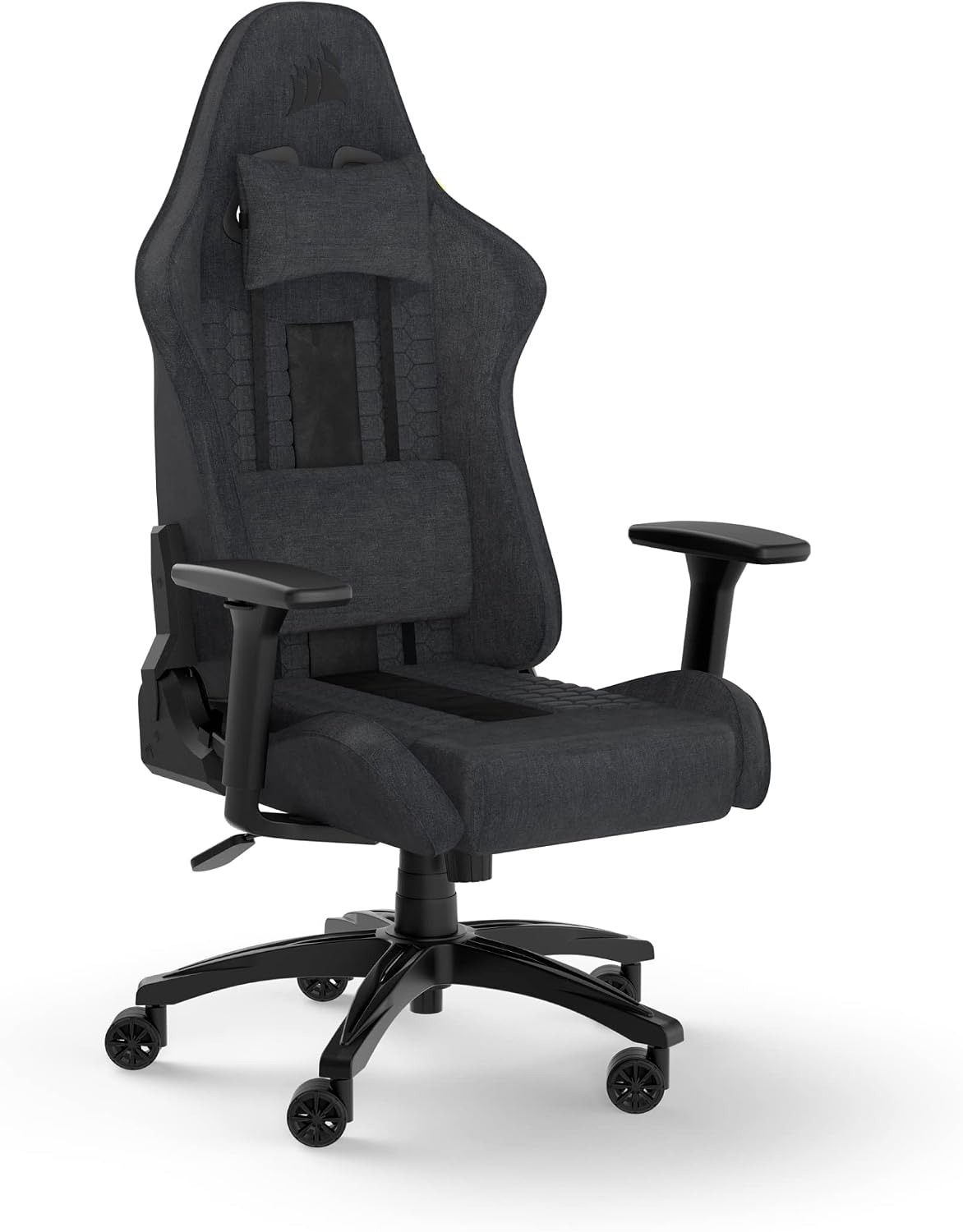
Corsair TC100 Relaxed
The Corsair TC100 Relaxed is worth comparing if you prefer a more straightforward gaming chair and do not want to pay for a complex internal lumbar mechanism. It has a relaxed seat design compared with some tightly bolstered racing-style chairs, while lumbar support depends on the specific configuration and supplied accessories.
Before purchasing, check exactly which cushions are included with the listing. A removable lumbar pillow is useful because it can be repositioned or removed, but it may shift during use and usually offers less precise adjustment than an integrated mechanism.
What to consider
- More straightforward gaming-chair design
- Seat shape and upholstery options
- Exact included lumbar and neck cushions
- Limited fine adjustment compared with premium internal systems
Best for: Budget-conscious buyers who want to compare a conventional gaming chair before paying more for adjustable lumbar hardware.
Built-In Lumbar Support vs. a Lumbar Pillow
The biggest difference between gaming-chair lumbar designs is how easily you can adjust the support to your body. Both built-in mechanisms and removable pillows can work, but they offer different levels of customization.
Built-In Adjustable Lumbar
A mechanism inside the backrest changes the height, depth, or curvature of the support. It stays attached to the chair and can be adjusted without moving a separate cushion.
Potential advantage: More precise positioning and less cushion movement.
Removable Lumbar Pillow
A separate cushion sits between your lower back and the backrest. You can usually move it, remove it, or replace it with a different cushion.
Potential advantage: Simplicity and the ability to experiment with pillow placement.
Fixed Lumbar Shaping
The backrest has a molded or padded curve intended to support the lower back without a separate mechanism.
Potential advantage: Fewer adjustment components, but less ability to change the support position.
There is no universally best design. A well-positioned pillow may feel better than an adjustable mechanism that pushes too far into your back. The most useful feature is the one that lets you maintain a comfortable, supported sitting position.
How to Choose the Right Lumbar Support
1. Look for Height Adjustment
The support should align with your lower-back curve rather than pressing into your mid-back. Height adjustment helps accommodate differences in torso length and backrest fit.
2. Check Depth and Pressure
Depth adjustment changes how far the support projects toward your back. More projection is not always better. Start with a gentle level of support and adjust until it feels comfortable without creating a pressure point.
3. Match the Chair to Your Body Size
Seat depth, seat width, backrest height, and armrest position all affect comfort. If the seat is too deep or the backrest is poorly matched to your torso, lumbar adjustment alone may not solve the fit problem.
For broader seats and higher weight ratings, see our Best Big and Tall Gaming Chairs guide and Best Wide Seat Gaming Chairs article.
4. Consider the Amount of Adjustment You Actually Need
If you tend to sit in one position and a basic lumbar cushion fits well, a premium mechanism may not be worth the extra cost. If you frequently change positions or have trouble getting a fixed pillow to sit in the right place, adjustable support may be more useful.
5. Check the Return Policy
Lumbar support is highly dependent on individual fit. Review the seller’s return conditions, warranty, and replacement-part policy before ordering, especially when buying an expensive chair online.
Lumbar Support for Long Gaming Sessions
If you game for several hours at a time, the goal is not to lock your back into one rigid position. Look for a chair that supports you comfortably while allowing you to adjust your sitting position throughout the day.
A Practical Comfort Checklist
- Set the seat height so your feet are supported.
- Adjust the lumbar support until it feels comfortable rather than forceful.
- Position the backrest and armrests to suit your desk.
- Change positions regularly instead of sitting rigidly for hours.
- Take standing or walking breaks during long sessions.
A gaming chair is not a medical treatment, and lumbar support does not guarantee that you will avoid back discomfort. If you experience persistent or worsening pain, do not rely on chair adjustments alone.
Common Buying Mistakes
Choosing the Firmest Support
A stronger curve can feel uncomfortable if it does not match your back. Prioritize fit over maximum projection.
Ignoring Seat Depth
A seat that is too deep or too shallow can make it harder to sit comfortably against the backrest.
Assuming a Pillow Is Adjustable
Some cushions have limited straps or positioning options. Check how the included pillow attaches and moves.
Buying by Appearance Alone
Racing-style bolsters and gaming aesthetics do not guarantee good lumbar fit or a suitable seat size.
Frequently Asked Questions
What is the best type of lumbar support for a gaming chair?
An adjustable built-in mechanism offers more control over the support position, while a removable pillow is simpler and can be repositioned. The best choice depends on your body shape, the chair’s backrest, and how much adjustment you need.
Is built-in lumbar support better than a pillow?
Not in every case. Built-in adjustment can provide more consistent positioning, but a separate pillow can work well if it fits your back and stays in place. Try to evaluate the actual fit instead of relying on the feature name.
Is adjustable lumbar support worth the extra cost?
It may be worth paying more if you need to fine-tune the support position or have not found a comfortable fit with fixed cushions. If a basic chair already fits you well, additional adjustment may offer limited practical value.
Are gaming chairs with lumbar support suitable for tall users?
They can be, but height alone does not determine fit. Check the recommended user-height range, seat depth, backrest height, and lumbar adjustment range. Taller users may need a chair with a longer seat and a support mechanism that reaches the right position.
Can lumbar support prevent back pain?
A well-fitting chair may make sitting more comfortable, but lumbar support cannot guarantee pain prevention or treat an underlying medical condition. Regular movement, workstation setup, and individual needs also matter.
Should I choose a gaming chair or an ergonomic office chair?
Compare both by fit, lumbar adjustment, seat depth, armrest range, and upholstery rather than appearance alone. If your chair will be used mainly for desk work, our Heavy Duty Office Chairs guide can help you explore alternatives.
Choose a Gaming Chair That Fits Your Back
Compare built-in lumbar adjustment, pillow placement, seat depth, and overall chair size before you buy. A well-matched chair is more useful than one with the longest feature list.
Disclosure: As an Amazon Associate, HeavyDutyChoice may earn from qualifying purchases. Product features, specifications, prices, and availability may change. Verify the exact model and current manufacturer information before purchasing.